

No custom layouts? If you have not overridden any SDK layouts or views, you typically only need to update the dependency version — no code changes required.
[9.0.x] -> [9.1.0]
RTL Layout Support
Arabic locale support has been added. All SDK layouts now useStart/End constraints instead of Left/Right to properly support right-to-left (RTL) languages.
If you have overridden any SDK layouts, you must migrate your custom layouts to use Start/End constraints instead of Left/Right. For example:
layout_constraintLeft_toLeftOf→layout_constraintStart_toStartOflayout_constraintRight_toRightOf→layout_constraintEnd_toEndOfandroid:layout_marginLeft→android:layout_marginStartandroid:layout_marginRight→android:layout_marginEndandroid:paddingLeft→android:paddingStartandroid:paddingRight→android:paddingEndgravity="left" → gravity="start"gravity="center|start" → gravity="center_vertical|start"
android:textAlignment="viewStart" was added to TextViews for proper RTL text rendering.
You can check our updated layouts here.
[8.x.x] -> [9.0.0]
New iDenfy Privacy Policy View
New privacy policy view is a required step for onboarding users. idenfy_fragment_privacy_policy_v2.xml was completely redone: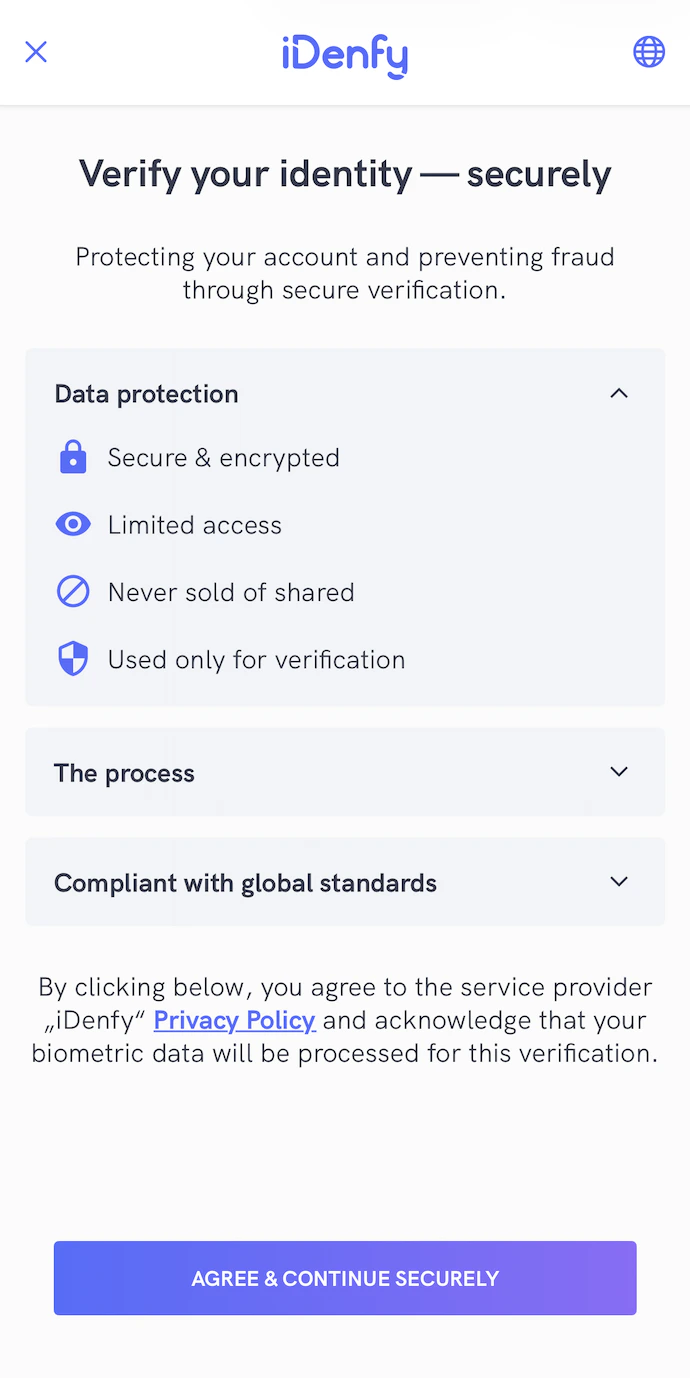
<?xml version="1.0" encoding="utf-8"?>
<androidx.constraintlayout.widget.ConstraintLayout xmlns:android="http://schemas.android.com/apk/res/android"
xmlns:app="http://schemas.android.com/apk/res-auto"
xmlns:tools="http://schemas.android.com/tools"
android:layout_width="match_parent"
android:layout_height="match_parent"
android:animateLayoutChanges="true"
android:background="@color/idenfyPrivacyPolicyViewBackgroundColor"
android:clickable="true"
android:focusable="true">
<include
android:id="@+id/include"
layout="@layout/idenfy_partial_layout_common_appbarlayout_with_language_selection_v2" />
<ScrollView
android:id="@+id/idenfy_scrollview_bank_verification_view"
android:layout_width="match_parent"
android:layout_height="0dp"
android:layout_marginBottom="8dp"
android:overScrollMode="never"
app:layout_constraintBottom_toTopOf="@+id/idenfy_button_privacy_policy_agree"
app:layout_constraintEnd_toEndOf="parent"
app:layout_constraintStart_toStartOf="parent"
app:layout_constraintTop_toBottomOf="@id/idenfy_appbarlayout_common">
<androidx.constraintlayout.widget.ConstraintLayout
android:id="@+id/idenfy_constraintlayout_bank_verification_viewholder"
android:layout_width="match_parent"
android:layout_height="wrap_content"
android:focusableInTouchMode="true">
<com.idenfy.idenfySdk.uicomponents.IDenfyTextView
android:id="@+id/idenfy_textview_common_information_title"
android:layout_width="0dp"
android:layout_height="wrap_content"
android:layout_marginStart="16dp"
android:layout_marginLeft="16dp"
android:layout_marginTop="32dp"
android:layout_marginEnd="16dp"
android:layout_marginRight="16dp"
android:gravity="center"
android:textAlignment="center"
android:theme="@style/idenfyPrivacyPolicyViewTitleStyle"
app:customfont="hkgrotesk_bold.ttf"
app:layout_constraintEnd_toEndOf="parent"
app:layout_constraintStart_toStartOf="parent"
app:layout_constraintTop_toTopOf="parent" />
<com.idenfy.idenfySdk.uicomponents.IDenfyTextView
android:id="@+id/idenfy_textview_common_information_description"
android:layout_width="0dp"
android:layout_height="wrap_content"
android:layout_marginStart="32dp"
android:layout_marginTop="24dp"
android:layout_marginEnd="32dp"
android:gravity="center"
android:text="@string/idenfy_privacy_policy_description_v2"
android:textAlignment="center"
android:theme="@style/idenfyPrivacyPolicyViewDescriptionStyle"
app:customfont="hkgrotesk_regular.ttf"
app:layout_constraintEnd_toEndOf="parent"
app:layout_constraintStart_toStartOf="parent"
app:layout_constraintTop_toBottomOf="@+id/idenfy_textview_common_information_title" />
<com.google.android.material.card.MaterialCardView
android:id="@+id/idenfy_cardview_data_protection"
android:layout_width="match_parent"
android:layout_height="wrap_content"
android:layout_marginStart="16dp"
android:layout_marginTop="12dp"
android:layout_marginEnd="16dp"
app:cardBackgroundColor="@color/idenfyPrivacyPolicyCardViewBackgroundColor"
app:cardCornerRadius="4dp"
app:cardElevation="0dp"
app:layout_constraintEnd_toEndOf="parent"
app:layout_constraintStart_toStartOf="parent"
app:layout_constraintTop_toBottomOf="@id/idenfy_textview_common_information_description">
<androidx.constraintlayout.widget.ConstraintLayout
android:layout_width="match_parent"
android:layout_height="wrap_content"
android:padding="16dp">
<com.idenfy.idenfySdk.uicomponents.IDenfyTextView
android:id="@+id/idenfy_tv_data_protection_title"
android:layout_width="0dp"
android:layout_height="wrap_content"
android:text="@string/idenfy_privacy_policy_data_protection_title"
android:theme="@style/idenfyPrivacyPolicyViewCardViewTextStyle"
app:customfont="hkgrotesk_bold.ttf"
app:layout_constraintEnd_toStartOf="@id/idenfy_iv_data_protection_arrow"
app:layout_constraintStart_toStartOf="parent"
app:layout_constraintTop_toTopOf="parent" />
<ImageView
android:id="@+id/idenfy_iv_data_protection_arrow"
android:layout_width="24dp"
android:layout_height="24dp"
android:src="@drawable/idenfy_ic_arrow_down"
app:tint="@color/idenfyPrivacyPolicyCardViewArrowIconTintColor"
app:layout_constraintBottom_toBottomOf="@id/idenfy_tv_data_protection_title"
app:layout_constraintEnd_toEndOf="parent"
app:layout_constraintTop_toTopOf="@id/idenfy_tv_data_protection_title" />
<androidx.constraintlayout.widget.ConstraintLayout
android:id="@+id/idenfy_constraint_layout_data_protection_content"
android:layout_width="0dp"
android:layout_height="wrap_content"
android:visibility="gone"
app:layout_constraintEnd_toEndOf="parent"
app:layout_constraintStart_toStartOf="parent"
app:layout_constraintTop_toBottomOf="@id/idenfy_tv_data_protection_title">
<ImageView
android:id="@+id/idenfy_iv_secure_encryption_icon"
android:layout_width="22dp"
android:layout_height="22dp"
android:layout_marginTop="16dp"
android:src="@drawable/idenfy_ic_privacy_lock"
app:tint="@color/idenfyPrivacyPolicyCardViewIconTintColor"
app:layout_constraintStart_toStartOf="parent"
app:layout_constraintTop_toTopOf="parent" />
<com.idenfy.idenfySdk.uicomponents.IDenfyTextView
android:id="@+id/idenfy_tv_secure_encryption_title"
android:layout_width="0dp"
android:layout_height="0dp"
android:layout_marginStart="8dp"
android:layout_marginEnd="8dp"
android:layout_marginTop="-8dp"
android:layout_marginBottom="-8dp"
android:gravity="center_vertical"
android:text="@string/idenfy_privacy_policy_secure_encryption_title"
android:theme="@style/idenfyPrivacyPolicyViewCardViewTextStyle"
app:customfont="hkgrotesk_regular.ttf"
app:layout_constraintBottom_toBottomOf="@id/idenfy_iv_secure_encryption_icon"
app:layout_constraintEnd_toEndOf="parent"
app:layout_constraintStart_toEndOf="@id/idenfy_iv_secure_encryption_icon"
app:layout_constraintTop_toTopOf="@id/idenfy_iv_secure_encryption_icon" />
<ImageView
android:id="@+id/idenfy_iv_limited_access_icon"
android:layout_width="22dp"
android:layout_height="22dp"
android:layout_marginTop="16dp"
android:src="@drawable/idenfy_ic_privacy_access"
app:tint="@color/idenfyPrivacyPolicyCardViewIconTintColor"
app:layout_constraintStart_toStartOf="parent"
app:layout_constraintTop_toBottomOf="@id/idenfy_iv_secure_encryption_icon" />
<com.idenfy.idenfySdk.uicomponents.IDenfyTextView
android:id="@+id/idenfy_tv_limited_access_title"
android:layout_width="0dp"
android:layout_height="0dp"
android:layout_marginStart="8dp"
android:layout_marginEnd="8dp"
android:layout_marginTop="-8dp"
android:layout_marginBottom="-8dp"
android:gravity="center_vertical"
android:text="@string/idenfy_privacy_policy_limited_access_title"
android:theme="@style/idenfyPrivacyPolicyViewCardViewTextStyle"
app:customfont="hkgrotesk_regular.ttf"
app:layout_constraintBottom_toBottomOf="@id/idenfy_iv_limited_access_icon"
app:layout_constraintEnd_toEndOf="parent"
app:layout_constraintStart_toEndOf="@id/idenfy_iv_limited_access_icon"
app:layout_constraintTop_toTopOf="@id/idenfy_iv_limited_access_icon" />
<ImageView
android:id="@+id/idenfy_iv_never_sold_icon"
android:layout_width="22dp"
android:layout_height="22dp"
android:layout_marginTop="16dp"
android:src="@drawable/idenfy_ic_privacy_block_share"
app:tint="@color/idenfyPrivacyPolicyCardViewIconTintColor"
app:layout_constraintStart_toStartOf="parent"
app:layout_constraintTop_toBottomOf="@id/idenfy_iv_limited_access_icon" />
<com.idenfy.idenfySdk.uicomponents.IDenfyTextView
android:id="@+id/idenfy_tv_never_sold_title"
android:layout_width="0dp"
android:layout_height="0dp"
android:layout_marginStart="8dp"
android:layout_marginEnd="8dp"
android:layout_marginTop="-8dp"
android:layout_marginBottom="-8dp"
android:gravity="center_vertical"
android:text="@string/idenfy_privacy_policy_never_sold_title"
android:theme="@style/idenfyPrivacyPolicyViewCardViewTextStyle"
app:customfont="hkgrotesk_regular.ttf"
app:layout_constraintBottom_toBottomOf="@id/idenfy_iv_never_sold_icon"
app:layout_constraintEnd_toEndOf="parent"
app:layout_constraintStart_toEndOf="@id/idenfy_iv_never_sold_icon"
app:layout_constraintTop_toTopOf="@id/idenfy_iv_never_sold_icon" />
<ImageView
android:id="@+id/idenfy_iv_used_for_verification_icon"
android:layout_width="22dp"
android:layout_height="22dp"
android:layout_marginTop="16dp"
android:src="@drawable/idenfy_ic_privacy_security"
app:tint="@color/idenfyPrivacyPolicyCardViewIconTintColor"
app:layout_constraintStart_toStartOf="parent"
app:layout_constraintTop_toBottomOf="@id/idenfy_iv_never_sold_icon" />
<com.idenfy.idenfySdk.uicomponents.IDenfyTextView
android:id="@+id/idenfy_tv_used_for_verification_title"
android:layout_width="0dp"
android:layout_height="0dp"
android:layout_marginStart="8dp"
android:layout_marginEnd="8dp"
android:layout_marginTop="-8dp"
android:layout_marginBottom="-8dp"
android:gravity="center_vertical"
android:text="@string/idenfy_privacy_policy_used_for_verification_title"
android:theme="@style/idenfyPrivacyPolicyViewCardViewTextStyle"
app:customfont="hkgrotesk_regular.ttf"
app:layout_constraintBottom_toBottomOf="@id/idenfy_iv_used_for_verification_icon"
app:layout_constraintEnd_toEndOf="parent"
app:layout_constraintStart_toEndOf="@id/idenfy_iv_used_for_verification_icon"
app:layout_constraintTop_toTopOf="@id/idenfy_iv_used_for_verification_icon" />
</androidx.constraintlayout.widget.ConstraintLayout>
</androidx.constraintlayout.widget.ConstraintLayout>
</com.google.android.material.card.MaterialCardView>
<com.google.android.material.card.MaterialCardView
android:id="@+id/idenfy_cardview_process"
android:layout_width="match_parent"
android:layout_height="wrap_content"
android:layout_marginStart="16dp"
android:layout_marginTop="24dp"
android:layout_marginEnd="16dp"
app:cardBackgroundColor="@color/idenfyPrivacyPolicyCardViewBackgroundColor"
app:cardCornerRadius="4dp"
app:cardElevation="0dp"
app:layout_constraintEnd_toEndOf="parent"
app:layout_constraintStart_toStartOf="parent"
app:layout_constraintTop_toBottomOf="@id/idenfy_cardview_data_protection">
<androidx.constraintlayout.widget.ConstraintLayout
android:layout_width="match_parent"
android:layout_height="wrap_content"
android:padding="16dp">
<com.idenfy.idenfySdk.uicomponents.IDenfyTextView
android:id="@+id/idenfy_tv_process_title"
android:layout_width="0dp"
android:layout_height="wrap_content"
android:text="@string/idenfy_privacy_policy_process_title"
android:theme="@style/idenfyPrivacyPolicyViewCardViewTextStyle"
app:customfont="hkgrotesk_bold.ttf"
app:layout_constraintEnd_toStartOf="@id/idenfy_iv_process_arrow"
app:layout_constraintStart_toStartOf="parent"
app:layout_constraintTop_toTopOf="parent" />
<ImageView
android:id="@+id/idenfy_iv_process_arrow"
android:layout_width="24dp"
android:layout_height="24dp"
android:src="@drawable/idenfy_ic_arrow_down"
app:layout_constraintBottom_toBottomOf="@id/idenfy_tv_process_title"
app:layout_constraintEnd_toEndOf="parent"
app:layout_constraintTop_toTopOf="@id/idenfy_tv_process_title"
app:tint="@color/idenfyPrivacyPolicyCardViewArrowIconTintColor" />
<androidx.constraintlayout.widget.ConstraintLayout
android:id="@+id/idenfy_constraint_layout_process_content"
android:layout_width="0dp"
android:layout_height="wrap_content"
android:visibility="gone"
app:layout_constraintEnd_toEndOf="parent"
app:layout_constraintStart_toStartOf="parent"
app:layout_constraintTop_toBottomOf="@id/idenfy_tv_process_title">
<ImageView
android:id="@+id/idenfy_iv_identity_photo_icon"
android:layout_width="22dp"
android:layout_height="22dp"
android:layout_marginTop="16dp"
android:src="@drawable/idenfy_ic_privacy_photo_identity_step"
app:tint="@color/idenfyPrivacyPolicyCardViewIconTintColor"
app:layout_constraintStart_toStartOf="parent"
app:layout_constraintTop_toTopOf="parent" />
<com.idenfy.idenfySdk.uicomponents.IDenfyTextView
android:id="@+id/idenfy_tv_identity_photo_title"
android:layout_width="0dp"
android:layout_height="0dp"
android:layout_marginStart="8dp"
android:layout_marginEnd="8dp"
android:layout_marginTop="-8dp"
android:layout_marginBottom="-8dp"
android:gravity="center_vertical"
android:text="@string/idenfy_privacy_policy_identity_photo_step_title"
android:theme="@style/idenfyPrivacyPolicyViewCardViewTextStyle"
app:customfont="hkgrotesk_regular.ttf"
app:layout_constraintBottom_toBottomOf="@id/idenfy_iv_identity_photo_icon"
app:layout_constraintEnd_toEndOf="parent"
app:layout_constraintStart_toEndOf="@id/idenfy_iv_identity_photo_icon"
app:layout_constraintTop_toTopOf="@id/idenfy_iv_identity_photo_icon" />
<ImageView
android:id="@+id/idenfy_iv_selfie_scan_icon"
android:layout_width="22dp"
android:layout_height="22dp"
android:layout_marginTop="16dp"
android:src="@drawable/idenfy_ic_privacy_selfie_check_step"
app:tint="@color/idenfyPrivacyPolicyCardViewIconTintColor"
app:layout_constraintStart_toStartOf="parent"
app:layout_constraintTop_toBottomOf="@id/idenfy_iv_identity_photo_icon" />
<com.idenfy.idenfySdk.uicomponents.IDenfyTextView
android:id="@+id/idenfy_tv_selfie_scan_title"
android:layout_width="0dp"
android:layout_height="0dp"
android:layout_marginStart="8dp"
android:layout_marginEnd="8dp"
android:layout_marginTop="-8dp"
android:layout_marginBottom="-8dp"
android:gravity="center_vertical"
android:text="@string/idenfy_privacy_policy_selfie_step_title"
android:theme="@style/idenfyPrivacyPolicyViewCardViewTextStyle"
app:customfont="hkgrotesk_regular.ttf"
app:layout_constraintBottom_toBottomOf="@id/idenfy_iv_selfie_scan_icon"
app:layout_constraintEnd_toEndOf="parent"
app:layout_constraintStart_toEndOf="@id/idenfy_iv_selfie_scan_icon"
app:layout_constraintTop_toTopOf="@id/idenfy_iv_selfie_scan_icon" />
<ImageView
android:id="@+id/idenfy_iv_automated_verification_icon"
android:layout_width="22dp"
android:layout_height="22dp"
android:layout_marginTop="16dp"
android:src="@drawable/idenfy_ic_privacy_automated_verification_step"
app:tint="@color/idenfyPrivacyPolicyCardViewIconTintColor"
app:layout_constraintStart_toStartOf="parent"
app:layout_constraintTop_toBottomOf="@id/idenfy_iv_selfie_scan_icon" />
<com.idenfy.idenfySdk.uicomponents.IDenfyTextView
android:id="@+id/idenfy_tv_automated_verification_title"
android:layout_width="0dp"
android:layout_height="0dp"
android:layout_marginStart="8dp"
android:layout_marginEnd="8dp"
android:layout_marginTop="-8dp"
android:layout_marginBottom="-8dp"
android:gravity="center_vertical"
android:text="@string/idenfy_privacy_policy_automated_verification_step_title"
android:theme="@style/idenfyPrivacyPolicyViewCardViewTextStyle"
app:customfont="hkgrotesk_regular.ttf"
app:layout_constraintBottom_toBottomOf="@id/idenfy_iv_automated_verification_icon"
app:layout_constraintEnd_toEndOf="parent"
app:layout_constraintStart_toEndOf="@id/idenfy_iv_automated_verification_icon"
app:layout_constraintTop_toTopOf="@id/idenfy_iv_automated_verification_icon" />
</androidx.constraintlayout.widget.ConstraintLayout>
</androidx.constraintlayout.widget.ConstraintLayout>
</com.google.android.material.card.MaterialCardView>
<com.google.android.material.card.MaterialCardView
android:id="@+id/idenfy_cardview_compliance"
android:layout_width="match_parent"
android:layout_height="wrap_content"
android:layout_marginStart="16dp"
android:layout_marginTop="12dp"
android:layout_marginEnd="16dp"
app:cardBackgroundColor="@color/idenfyLightGrayColor"
app:cardCornerRadius="4dp"
app:cardElevation="0dp"
app:layout_constraintEnd_toEndOf="parent"
app:layout_constraintStart_toStartOf="parent"
app:layout_constraintTop_toBottomOf="@id/idenfy_cardview_process">
<androidx.constraintlayout.widget.ConstraintLayout
android:layout_width="match_parent"
android:layout_height="wrap_content"
android:padding="16dp">
<com.idenfy.idenfySdk.uicomponents.IDenfyTextView
android:id="@+id/idenfy_tv_compliance_title"
android:layout_width="0dp"
android:layout_height="wrap_content"
android:text="@string/idenfy_privacy_policy_compliance_title"
android:theme="@style/idenfyPrivacyPolicyViewCardViewTextStyle"
app:customfont="hkgrotesk_bold.ttf"
app:layout_constraintEnd_toStartOf="@id/idenfy_iv_compliance_arrow"
app:layout_constraintStart_toStartOf="parent"
app:layout_constraintTop_toTopOf="parent" />
<ImageView
android:id="@+id/idenfy_iv_compliance_arrow"
android:layout_width="24dp"
android:layout_height="24dp"
android:src="@drawable/idenfy_ic_arrow_down"
app:layout_constraintBottom_toBottomOf="@id/idenfy_tv_compliance_title"
app:layout_constraintEnd_toEndOf="parent"
app:layout_constraintTop_toTopOf="@id/idenfy_tv_compliance_title"
app:tint="@color/idenfyPrivacyPolicyCardViewArrowIconTintColor" />
<androidx.constraintlayout.widget.ConstraintLayout
android:id="@+id/idenfy_constraint_layout_compliance_content"
android:layout_width="0dp"
android:layout_height="wrap_content"
android:visibility="gone"
app:layout_constraintEnd_toEndOf="parent"
app:layout_constraintStart_toStartOf="parent"
app:layout_constraintTop_toBottomOf="@id/idenfy_tv_compliance_title">
<com.idenfy.idenfySdk.uicomponents.IDenfyTextView
android:id="@+id/idenfy_tv_compliance_description"
android:layout_width="0dp"
android:layout_height="wrap_content"
android:layout_marginTop="16dp"
android:layout_marginEnd="8dp"
android:gravity="center_vertical"
android:text="@string/idenfy_privacy_policy_compliance_description"
android:theme="@style/idenfyPrivacyPolicyViewCardViewTextStyle"
app:customfont="hkgrotesk_regular.ttf"
app:layout_constraintBottom_toBottomOf="parent"
app:layout_constraintEnd_toEndOf="parent"
app:layout_constraintStart_toStartOf="parent"
app:layout_constraintTop_toTopOf="parent" />
</androidx.constraintlayout.widget.ConstraintLayout>
</androidx.constraintlayout.widget.ConstraintLayout>
</com.google.android.material.card.MaterialCardView>
<com.idenfy.idenfySdk.uicomponents.IDenfyTextView
android:id="@+id/idenfy_tv_privacy_policy_description"
android:layout_width="0dp"
android:layout_height="wrap_content"
android:layout_marginStart="16dp"
android:layout_marginTop="16dp"
android:layout_marginEnd="16dp"
android:gravity="center"
android:theme="@style/idenfyPrivacyPolicyViewCardViewTextStyle"
app:customfont="hkgrotesk_regular.ttf"
app:layout_constraintBottom_toBottomOf="parent"
app:layout_constraintEnd_toEndOf="parent"
app:layout_constraintStart_toStartOf="parent"
app:layout_constraintTop_toBottomOf="@id/idenfy_cardview_compliance"
app:layout_constraintVertical_bias="0.0"
app:layout_goneMarginEnd="16dp" />
<com.idenfy.idenfySdk.uicomponents.IDenfyTextView
android:id="@+id/idenfy_tv_privacy_policy_partner_description"
android:layout_width="0dp"
android:layout_height="wrap_content"
android:layout_marginStart="16dp"
android:layout_marginTop="16dp"
android:layout_marginEnd="16dp"
android:gravity="center"
android:theme="@style/idenfyPrivacyPolicyViewCardViewTextStyle"
app:customfont="hkgrotesk_regular.ttf"
app:layout_constraintBottom_toBottomOf="parent"
app:layout_constraintEnd_toEndOf="parent"
app:layout_constraintStart_toStartOf="parent"
app:layout_constraintTop_toBottomOf="@id/idenfy_tv_privacy_policy_description"
app:layout_constraintVertical_bias="0.0"
app:layout_goneMarginEnd="16dp" />
</androidx.constraintlayout.widget.ConstraintLayout>
</ScrollView>
<com.idenfy.idenfySdk.uicomponents.IDenfyButton
android:id="@+id/idenfy_button_privacy_policy_agree"
android:layout_width="0dp"
android:layout_height="42dp"
android:layout_marginStart="32dp"
android:layout_marginEnd="32dp"
android:layout_marginBottom="32dp"
android:background="@drawable/idenfy_ic_gradient_button_background"
android:gravity="center"
android:text="@string/idenfy_privacy_policy_agree_button_title_v2"
android:theme="@style/idenfyPrivacyPolicyViewButtonStyle"
app:customfont="hkgrotesk_bold.ttf"
app:layout_constraintBottom_toBottomOf="parent"
app:layout_constraintEnd_toEndOf="parent"
app:layout_constraintStart_toStartOf="parent" />
<com.airbnb.lottie.LottieAnimationView
android:id="@+id/idenfy_lottie_animation_loading"
android:layout_width="25dp"
android:layout_height="25dp"
android:layout_centerInParent="true"
android:layout_marginStart="16dp"
android:elevation="10dp"
android:visibility="invisible"
app:layout_constraintBottom_toBottomOf="@id/idenfy_button_privacy_policy_agree"
app:layout_constraintStart_toStartOf="@+id/idenfy_button_privacy_policy_agree"
app:layout_constraintTop_toTopOf="@id/idenfy_button_privacy_policy_agree"
app:lottie_autoPlay="true"
app:lottie_loop="true"
app:lottie_rawRes="@raw/idenfy_custom_country_loader"
app:lottie_colorFilter="@color/idenfyPrivacyPolicyContinueButtonLoadingSpinnerTintColor"/>
</androidx.constraintlayout.widget.ConstraintLayout>
<color name="idenfyLightGrayColor">#F2F4F8</color>
Country and Document Selection Steps Combined Into One View
A new Country & Document selection view was added, which combines the old two views into one. The new idenfy_fragment_country_and_document_selection_fragment.xml layout is added: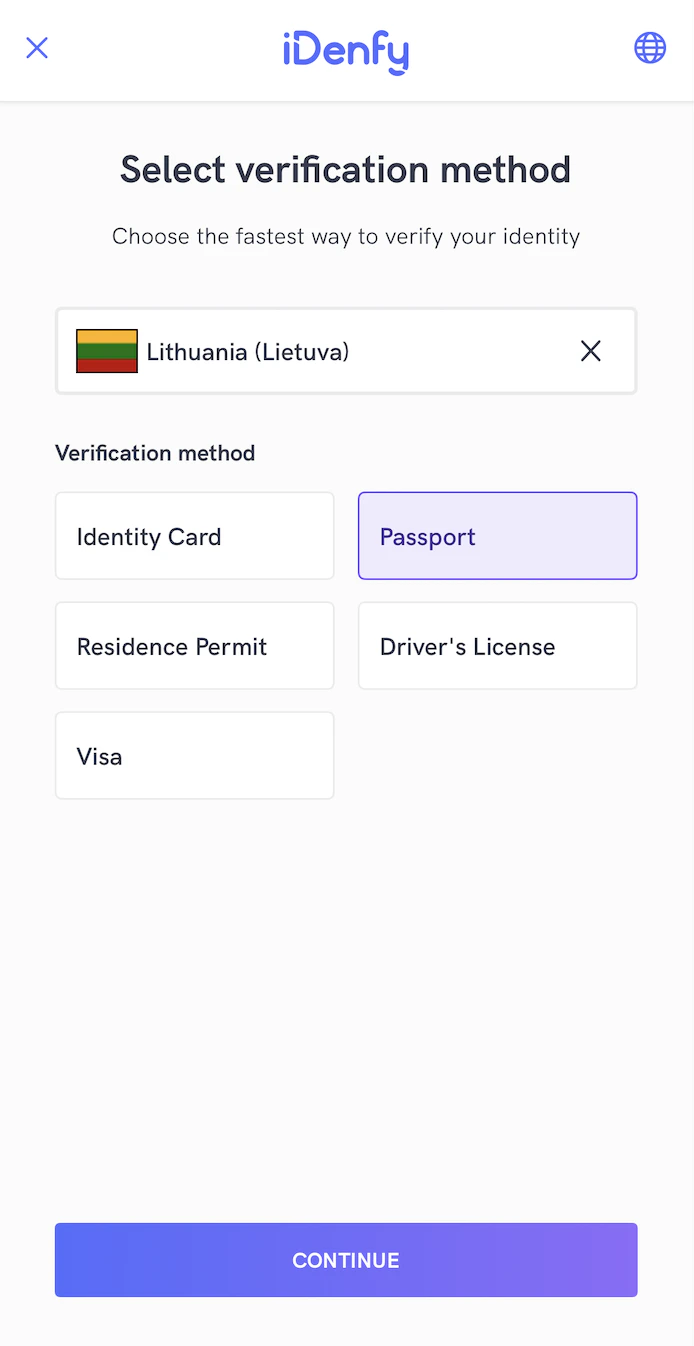
<?xml version="1.0" encoding="utf-8"?>
<androidx.constraintlayout.widget.ConstraintLayout xmlns:android="http://schemas.android.com/apk/res/android"
    xmlns:app="http://schemas.android.com/apk/res-auto"
    android:layout_width="match_parent"
    android:layout_height="match_parent"
    android:background="@color/idenfyCountryAndDocumentSelectionViewBackgroundColor"
    android:clickable="true"
    android:focusable="true"
    android:focusableInTouchMode="true">

    <include layout="@layout/idenfy_partial_layout_common_appbarlayout_with_language_selection_v2" />

    <androidx.constraintlayout.widget.ConstraintLayout
        android:id="@+id/idenfy_constraintlayout_common_information"
        android:layout_width="0dp"
        android:layout_height="wrap_content"
        app:layout_constraintEnd_toEndOf="parent"
        app:layout_constraintHorizontal_bias="0.0"
        app:layout_constraintStart_toStartOf="parent"
        app:layout_constraintTop_toBottomOf="@+id/idenfy_appbarlayout_common">

        <com.idenfy.idenfySdk.uicomponents.IDenfyTextView
            android:id="@+id/idenfy_textview_common_information_title"
            android:layout_width="0dp"
            android:layout_height="wrap_content"
            android:layout_marginStart="16dp"
            android:layout_marginLeft="16dp"
            android:layout_marginTop="32dp"
            android:layout_marginEnd="16dp"
            android:layout_marginRight="16dp"
            android:gravity="center"
            android:textAlignment="center"
            android:theme="@style/idenfyCountryAndDocumentSelectionViewTitleStyle"
            app:customfont="hkgrotesk_bold.ttf"
            app:layout_constraintEnd_toEndOf="parent"
            app:layout_constraintStart_toStartOf="parent"
            app:layout_constraintTop_toTopOf="parent" />

        <com.idenfy.idenfySdk.uicomponents.IDenfyTextView
            android:id="@+id/idenfy_textview_common_information_description"
            android:layout_width="0dp"
            android:layout_height="wrap_content"
            android:layout_marginStart="16dp"
            android:layout_marginTop="24dp"
            android:layout_marginEnd="16dp"
            android:gravity="center"
            android:textAlignment="center"
            android:theme="@style/idenfyCountryAndDocumentSelectionViewDescriptionStyle"
            app:customfont="hkgrotesk_regular.ttf"
            app:layout_constraintEnd_toEndOf="parent"
            app:layout_constraintStart_toStartOf="parent"
            app:layout_constraintTop_toBottomOf="@+id/idenfy_textview_common_information_title" />

    </androidx.constraintlayout.widget.ConstraintLayout>

    <androidx.core.widget.NestedScrollView
        android:id="@+id/idenfy_scrollview_country_and_document_selection_view"
        android:layout_width="match_parent"
        android:layout_height="0dp"
        android:layout_marginBottom="8dp"
        android:overScrollMode="never"
        app:layout_constraintBottom_toTopOf="@+id/idenfy_button_country_and_document_selection_continue"
        app:layout_constraintEnd_toEndOf="parent"
        app:layout_constraintStart_toStartOf="parent"
        app:layout_constraintTop_toBottomOf="@id/idenfy_constraintlayout_common_information">

        <androidx.constraintlayout.widget.ConstraintLayout
            android:id="@+id/idenfy_constraintlayout_country_and_document_selection_viewholder"
            android:layout_width="match_parent"
            android:layout_height="wrap_content"
            android:focusableInTouchMode="true">

            <com.idenfy.idenfySdk.uicomponents.IDenfyTextView
                android:id="@+id/idenfy_tv_pick_country"
                android:layout_width="0dp"
                android:layout_height="50dp"
                android:layout_marginStart="24dp"
                android:layout_marginTop="32dp"
                android:layout_marginEnd="24dp"
                android:background="@drawable/idenfy_custom_country_and_document_selection_item_selection_input_item_background"
                android:gravity="center|start"
                android:paddingStart="10dp"
                android:paddingEnd="20dp"
                android:theme="@style/idenfyCountryAndDocumentSelectionViewItemSelectionStyle"
                app:customfont="hkgrotesk_semibold.ttf"
                app:layout_constraintEnd_toEndOf="parent"
                app:layout_constraintStart_toStartOf="parent"
                app:layout_constraintTop_toTopOf="parent" />

            <ImageView
                android:id="@+id/idenfy_iv_pick_country"
                android:layout_width="40dp"
                android:layout_height="wrap_content"
                android:layout_marginStart="16dp"
                android:adjustViewBounds="true"
                android:background="@drawable/idenfy_flag_black_border"
                android:cropToPadding="true"
                android:scaleType="centerCrop"
                android:visibility="invisible"
                app:layout_constraintBottom_toBottomOf="@id/idenfy_tv_pick_country"
                app:layout_constraintStart_toStartOf="@id/idenfy_tv_pick_country"
                app:layout_constraintTop_toTopOf="@id/idenfy_tv_pick_country" />

            <ImageView
                android:id="@+id/idenfy_iv_pick_country2"
                android:layout_width="35dp"
                android:layout_height="25dp"
                android:layout_marginStart="16dp"
                android:adjustViewBounds="false"
                android:background="@drawable/idenfy_flag_black_border"
                android:cropToPadding="false"
                android:scaleType="centerCrop"
                android:visibility="invisible"
                app:layout_constraintBottom_toBottomOf="@id/idenfy_tv_pick_country"
                app:layout_constraintStart_toStartOf="@id/idenfy_tv_pick_country"
                app:layout_constraintTop_toTopOf="@id/idenfy_tv_pick_country" />

            <ImageView
                android:id="@+id/idenfy_iv_arrow"
                android:layout_width="20dp"
                android:layout_height="20dp"
                android:layout_marginEnd="16dp"
                android:elevation="50dp"
                app:layout_constraintBottom_toBottomOf="@+id/idenfy_tv_pick_country"
                app:layout_constraintEnd_toEndOf="@+id/idenfy_tv_pick_country"
                app:layout_constraintTop_toTopOf="@+id/idenfy_tv_pick_country"
                app:srcCompat="@drawable/idenfy_ic_arrow_down"
                app:tint="@color/idenfyCountryAndDocumentSelectionViewItemSelectionTrailingIconTintColor" />

            <ImageView
                android:id="@+id/idenfy_iv_cancel"
                android:layout_width="20dp"
                android:layout_height="20dp"
                android:layout_marginEnd="16dp"
                android:elevation="50dp"
                android:padding="4dp"
                android:visibility="invisible"
                app:layout_constraintBottom_toBottomOf="@+id/idenfy_tv_pick_country"
                app:layout_constraintEnd_toEndOf="@+id/idenfy_tv_pick_country"
                app:layout_constraintTop_toTopOf="@+id/idenfy_tv_pick_country"
                app:srcCompat="@drawable/idenfy_ic_language_selection_close_button"
                app:tint="@color/idenfyCountryAndDocumentSelectionViewItemSelectionTrailingIconTintColor" />

            <androidx.constraintlayout.widget.ConstraintLayout
                android:id="@+id/idenfy_constraintlayout_document_selection_viewholder"
                android:layout_width="match_parent"
                android:layout_height="wrap_content"
                android:layout_marginTop="16dp"
                app:layout_constraintTop_toBottomOf="@+id/idenfy_tv_pick_country"
                android:focusableInTouchMode="true">

                <com.idenfy.idenfySdk.uicomponents.IDenfyTextView
                    android:id="@+id/idenfy_textview_verification_method_title"
                    android:layout_width="0dp"
                    android:layout_height="wrap_content"
                    android:layout_marginTop="16dp"
                    android:gravity="start"
                    android:theme="@style/idenfyCountryAndDocumentSelectionViewVerificationMethodTitleStyle"
                    app:customfont="hkgrotesk_bold.ttf"
                    android:layout_marginStart="24dp"
                    android:layout_marginEnd="24dp"
                    app:layout_constraintEnd_toEndOf="parent"
                    app:layout_constraintStart_toStartOf="parent"
                    app:layout_constraintTop_toTopOf="parent" />

                <androidx.recyclerview.widget.RecyclerView
                    android:id="@+id/idenfy_recyclerview_digital_ids"
                    android:layout_width="match_parent"
                    android:layout_height="wrap_content"
                    android:layout_marginTop="4dp"
                    android:layout_marginStart="16dp"
                    android:layout_marginEnd="16dp"
                    android:overScrollMode="never"
                    app:layout_constraintEnd_toEndOf="parent"
                    app:layout_constraintStart_toStartOf="parent"
                    app:layout_constraintTop_toBottomOf="@id/idenfy_textview_verification_method_title" />

                <androidx.constraintlayout.widget.ConstraintLayout
                    android:id="@+id/idenfy_constraintlayout_physical_document_title_container"
                    android:layout_width="0dp"
                    android:layout_height="wrap_content"
                    android:layout_marginTop="4dp"
                    android:layout_marginStart="24dp"
                    android:layout_marginEnd="24dp"
                    app:layout_constraintEnd_toEndOf="parent"
                    app:layout_constraintStart_toStartOf="parent"
                    app:layout_constraintTop_toBottomOf="@id/idenfy_recyclerview_digital_ids">

                    <View
                        android:id="@+id/idenfy_view_physical_document_line_left"
                        android:layout_width="0dp"
                        android:layout_height="1dp"
                        android:layout_marginTop="1dp"
                        android:alpha="0.2"
                        android:background="@color/idenfyCountryAndDocumentSelectionViewPhysicalDocumentTitleDividerColor"
                        app:layout_constraintBottom_toBottomOf="parent"
                        app:layout_constraintEnd_toStartOf="@+id/idenfy_textview_physical_document_title"
                        app:layout_constraintStart_toStartOf="parent"
                        app:layout_constraintTop_toTopOf="parent" />

                    <com.idenfy.idenfySdk.uicomponents.IDenfyTextView
                        android:id="@+id/idenfy_textview_physical_document_title"
                        android:layout_width="wrap_content"
                        android:layout_height="wrap_content"
                        android:gravity="center"
                        android:paddingStart="12dp"
                        android:paddingEnd="12dp"
                        android:theme="@style/idenfyCountryAndDocumentSelectionViewPhysicalDocumentTitleStyle"
                        app:customfont="hkgrotesk_regular.ttf"
                        app:layout_constraintBottom_toBottomOf="parent"
                        app:layout_constraintEnd_toEndOf="parent"
                        app:layout_constraintStart_toStartOf="parent"
                        app:layout_constraintTop_toTopOf="parent" />

                    <View
                        android:id="@+id/idenfy_view_physical_document_line_right"
                        android:layout_width="0dp"
                        android:layout_height="1dp"
                        android:alpha="0.2"
                        android:layout_marginTop="1dp"
                        android:background="@color/idenfyCountryAndDocumentSelectionViewPhysicalDocumentTitleDividerColor"
                        app:layout_constraintBottom_toBottomOf="parent"
                        app:layout_constraintEnd_toEndOf="parent"
                        app:layout_constraintStart_toEndOf="@+id/idenfy_textview_physical_document_title"
                        app:layout_constraintTop_toTopOf="parent" />

                </androidx.constraintlayout.widget.ConstraintLayout>

                <androidx.recyclerview.widget.RecyclerView
                    android:id="@+id/idenfy_recyclerview_document_types"
                    android:layout_width="match_parent"
                    android:layout_height="wrap_content"
                    android:layout_marginTop="4dp"
                    android:layout_marginStart="16dp"
                    android:layout_marginEnd="16dp"
                    android:overScrollMode="never"
                    app:layout_constraintEnd_toEndOf="parent"
                    app:layout_constraintStart_toStartOf="parent"
                    app:layout_constraintTop_toBottomOf="@id/idenfy_constraintlayout_physical_document_title_container" />

            </androidx.constraintlayout.widget.ConstraintLayout>
        </androidx.constraintlayout.widget.ConstraintLayout>
    </androidx.core.widget.NestedScrollView>

    <com.idenfy.idenfySdk.uicomponents.IDenfyButton
        android:id="@+id/idenfy_button_country_and_document_selection_continue"
        android:layout_width="0dp"
        android:layout_height="42dp"
        android:layout_marginStart="32dp"
        android:layout_marginLeft="32dp"
        android:layout_marginEnd="32dp"
        android:layout_marginRight="32dp"
        android:layout_marginBottom="32dp"
        android:background="@color/idenfyCountryAndDocumentSelectionViewContinueButtonDisabledBackgroundColor"
        android:enabled="false"
        android:gravity="center"
        android:theme="@style/idenfyCountryAndDocumentSelectionViewContinueDisabledButtonStyle"
        app:customfont="hkgrotesk_bold.ttf"
        app:layout_constraintBottom_toBottomOf="parent"
        app:layout_constraintEnd_toEndOf="parent"
        app:layout_constraintStart_toStartOf="parent" />

    <com.airbnb.lottie.LottieAnimationView
        android:id="@+id/idenfy_lottie_animation_loading"
        android:layout_width="25dp"
        android:layout_height="25dp"
        android:layout_centerInParent="true"
        android:layout_marginStart="16dp"
        android:elevation="25dp"
        android:visibility="invisible"
        app:layout_constraintBottom_toBottomOf="@+id/idenfy_button_country_and_document_selection_continue"
        app:layout_constraintStart_toStartOf="@+id/idenfy_button_country_and_document_selection_continue"
        app:layout_constraintTop_toTopOf="@+id/idenfy_button_country_and_document_selection_continue"
        app:lottie_autoPlay="true"
        app:lottie_colorFilter="@color/idenfyCountryAndDocumentSelectionViewContinueButtonLoadingSpinnerTintColor"
        app:lottie_loop="true"
        app:lottie_rawRes="@raw/idenfy_custom_country_loader" />

</androidx.constraintlayout.widget.ConstraintLayout>
    <color name="idenfyPurpleColor">#734BFB</color>
    <color name="idenfyPurpleTextColor">#452D97</color>
    <color name="idenfyPurpleBackgroundColor">#EFEBFF</color>
Auto Country and Document Detection Feature
Along with this feature, a new card is presented in idenfy_fragment_document_camera_preview_session_v2.xml to show detected country and supported documents for it. An updated layout looks like this: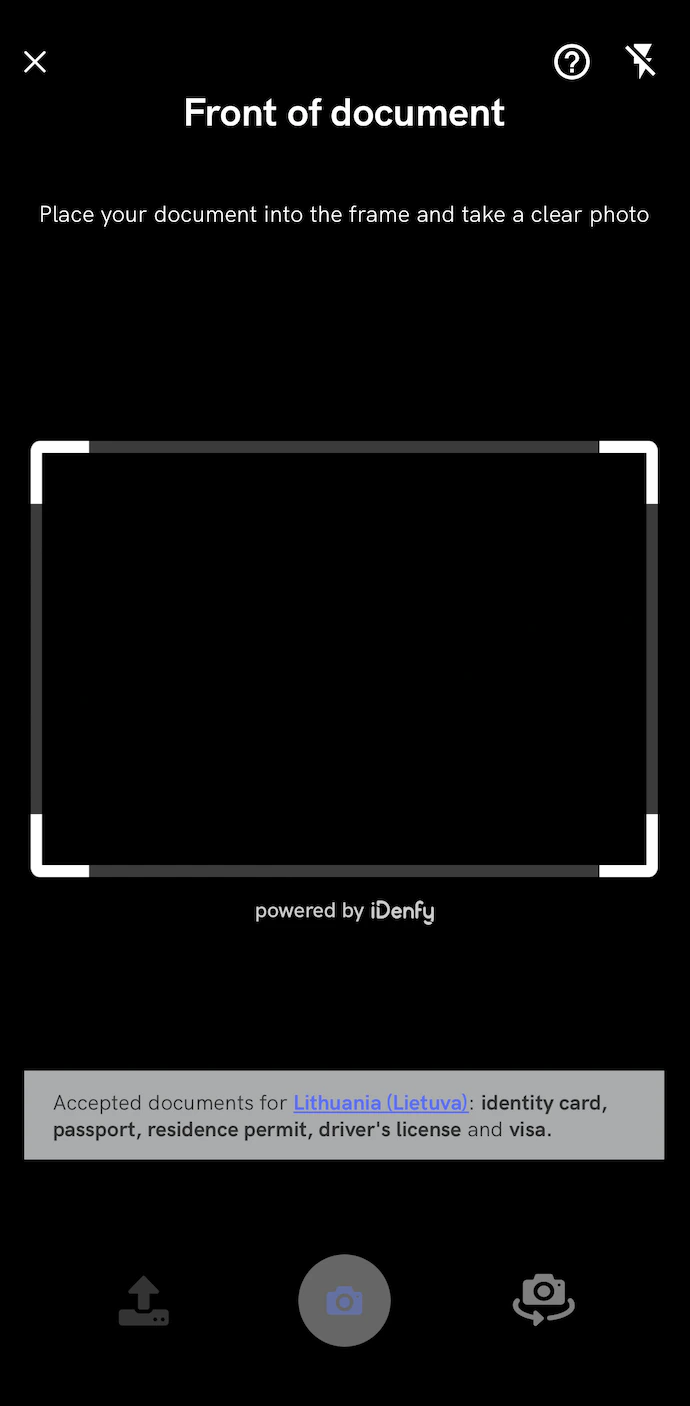
<androidx.coordinatorlayout.widget.CoordinatorLayout xmlns:android="http://schemas.android.com/apk/res/android"
    xmlns:app="http://schemas.android.com/apk/res-auto"
    xmlns:tools="http://schemas.android.com/tools"
    android:id="@+id/idenfy_camera_view_root_layout"
    android:layout_width="match_parent"
    android:layout_height="match_parent"
    android:animateLayoutChanges="true"
    android:clickable="true"
    android:focusable="true">

    <include layout="@layout/idenfy_partial_layout_camera_session_appbarlayout_v2" />

    <androidx.constraintlayout.widget.ConstraintLayout
        android:layout_width="match_parent"
        android:layout_height="match_parent"
        android:background="@color/idenfyDocumentCameraPreviewSessionBackgroundColor"
        android:clickable="true"
        android:focusable="true"
        android:padding="0dp">

        <include layout="@layout/idenfy_partial_layout_document_camera_session_camerax_preview" />

        <RelativeLayout
            android:id="@+id/idenfy_relativelayout_document_camera_preview_session_customviewholder"
            android:layout_width="match_parent"
            android:layout_height="match_parent">

            <com.idenfy.idenfySdk.idenfycore.ui.customviews.CustomViewHolder
                android:layout_width="match_parent"
                android:layout_height="match_parent" />
        </RelativeLayout>

        <View
            android:id="@+id/idenfy_view_camera_preview_session_bottom_action_buttons"
            android:layout_width="match_parent"
            android:layout_height="0dp"
            android:background="@color/idenfyDocumentCameraPreviewSessionBottomActionButtonsViewBackgroundColor"
            app:layout_constraintBottom_toBottomOf="parent"
            app:layout_constraintEnd_toEndOf="parent"
            app:layout_constraintStart_toStartOf="parent"
            app:layout_constraintTop_toBottomOf="@+id/idenfy_guideline_camera_preview_session_horizontal_085" />

        <com.google.android.material.floatingactionbutton.FloatingActionButton
            android:id="@+id/idenfy_fab_camera_preview_session_take_photo"
            android:layout_width="wrap_content"
            android:layout_height="wrap_content"
            android:tint="@color/idenfyDocumentCameraPreviewSessionTakePhotoButtonUnFocusedTintColor"
            app:backgroundTint="@color/idenfyDocumentCameraPreviewSessionTakePhotoButtonUnFocusedBackgroundColor"
            app:fabCustomSize="52dp"
            app:layout_constraintBottom_toBottomOf="@+id/idenfy_view_camera_preview_session_bottom_action_buttons"
            app:layout_constraintEnd_toEndOf="parent"
            app:layout_constraintStart_toStartOf="@+id/idenfy_view_camera_preview_session_bottom_action_buttons"
            app:layout_constraintTop_toTopOf="@+id/idenfy_view_camera_preview_session_bottom_action_buttons" />

        <androidx.appcompat.widget.AppCompatImageView
            android:id="@+id/idenfy_imageview_camera_preview_session_take_photo_icon"
            android:layout_width="wrap_content"
            android:layout_height="wrap_content"
            android:elevation="16dp"
            app:layout_constraintBottom_toBottomOf="@+id/idenfy_fab_camera_preview_session_take_photo"
            app:layout_constraintEnd_toEndOf="@+id/idenfy_fab_camera_preview_session_take_photo"
            app:layout_constraintStart_toStartOf="@+id/idenfy_fab_camera_preview_session_take_photo"
            app:layout_constraintTop_toTopOf="@+id/idenfy_fab_camera_preview_session_take_photo"
            app:srcCompat="@drawable/idenfy_custom_drawable_camera_preview_session_take_photo_icon_v2"
            tools:targetApi="lollipop" />

        <androidx.appcompat.widget.AppCompatImageView
            android:id="@+id/idenfy_imageview_camera_preview_session_upload_photo"
            android:layout_width="wrap_content"
            android:layout_height="wrap_content"
            android:paddingStart="10dp"
            android:paddingLeft="10dp"
            android:paddingTop="10dp"
            android:paddingEnd="10dp"
            android:paddingRight="10dp"
            android:paddingBottom="10dp"
            app:layout_constraintBottom_toBottomOf="@+id/idenfy_view_camera_preview_session_bottom_action_buttons"
            app:layout_constraintEnd_toStartOf="@+id/idenfy_fab_camera_preview_session_take_photo"
            app:layout_constraintStart_toStartOf="parent"
            app:layout_constraintTop_toTopOf="@+id/idenfy_guideline_camera_preview_session_horizontal_085"
            app:srcCompat="@drawable/idenfy_custom_drawable_camera_preview_session_upload_photo_icon_v2" />

        <androidx.appcompat.widget.AppCompatImageView
            android:id="@+id/idenfy_imageview_camera_preview_switch_lens"
            android:layout_width="wrap_content"
            android:layout_height="wrap_content"
            android:paddingStart="10dp"
            android:paddingLeft="10dp"
            android:paddingTop="10dp"
            android:paddingEnd="10dp"
            android:paddingRight="10dp"
            android:paddingBottom="10dp"
            android:visibility="gone"
            app:layout_constraintBottom_toBottomOf="@+id/idenfy_view_camera_preview_session_bottom_action_buttons"
            app:layout_constraintEnd_toEndOf="@+id/idenfy_view_camera_preview_session_bottom_action_buttons"
            app:layout_constraintStart_toEndOf="@id/idenfy_fab_camera_preview_session_take_photo"
            app:layout_constraintTop_toTopOf="@+id/idenfy_guideline_camera_preview_session_horizontal_085"
            app:layout_constraintVertical_bias="0.53"
            app:srcCompat="@drawable/idenfy_ic_camera_preview_switch_lens" />

        <androidx.appcompat.widget.AppCompatImageView
            android:id="@+id/idenfy_imageview_camera_preview_session_placeholder_for_cropping"
            android:layout_width="0dp"
            android:layout_height="0dp"
            android:layout_centerInParent="true"
            android:scaleType="fitXY"
            android:visibility="visible"
            app:layout_constraintBottom_toBottomOf="parent"
            app:layout_constraintEnd_toEndOf="parent"
            app:layout_constraintStart_toStartOf="parent"
            app:layout_constraintTop_toTopOf="parent"
            app:srcCompat="@drawable/idenfy_ic_camera_rectangle_v2" />

        <androidx.constraintlayout.widget.Guideline
            android:id="@+id/idenfy_guideline_camera_preview_session_horizontal_085"
            android:layout_width="wrap_content"
            android:layout_height="wrap_content"
            android:orientation="horizontal"
            app:layout_constraintGuide_percent="0.85" />

        <androidx.constraintlayout.widget.ConstraintLayout
            android:id="@+id/idenfy_document_camera_accepted_documents_alert"
            android:layout_width="match_parent"
            android:layout_height="wrap_content"
            android:minHeight="50dp"
            android:layout_gravity="center_vertical"
            android:layout_marginStart="16dp"
            android:layout_marginEnd="16dp"
            android:layout_marginBottom="16dp"
            android:visibility="gone"
            android:alpha="0.7"
            android:background="@color/idenfyLightGrayColor"
            app:layout_constraintBottom_toTopOf="@+id/idenfy_view_camera_preview_session_bottom_action_buttons"
            app:layout_constraintEnd_toEndOf="parent"
            app:layout_constraintStart_toStartOf="parent">

            <com.idenfy.idenfySdk.uicomponents.IDenfyTextView
                android:id="@+id/idenfy_textview_accepted_documents_title"
                android:layout_width="0dp"
                android:layout_height="wrap_content"
                android:layout_marginTop="8dp"
                android:layout_marginBottom="8dp"
                android:layout_marginStart="16dp"
                android:layout_marginEnd="24dp"
                android:theme="@style/idenfyDocumentCameraAcceptedDocumentsAlertTitleStyle"
                app:customfont="hkgrotesk_regular.ttf"
                app:layout_constraintBottom_toBottomOf="parent"
                app:layout_constraintEnd_toEndOf="parent"
                app:layout_constraintStart_toStartOf="parent"
                app:layout_constraintTop_toTopOf="parent" />

        </androidx.constraintlayout.widget.ConstraintLayout>

        <androidx.constraintlayout.widget.ConstraintLayout
            android:id="@+id/idenfy_document_camera_warning_alert"
            android:layout_width="match_parent"
            android:layout_height="50dp"
            android:layout_gravity="center_vertical"
            android:layout_marginStart="16dp"
            android:layout_marginEnd="16dp"
            android:layout_marginBottom="16dp"
            android:alpha="0.7"
            android:visibility="invisible"
            android:background="@color/idenfyWarningLightYellowV2"
            app:layout_constraintBottom_toTopOf="@+id/idenfy_document_camera_accepted_documents_alert"
            app:layout_constraintEnd_toEndOf="parent"
            app:layout_constraintStart_toStartOf="parent">

            <ImageView
                android:id="@+id/idenfy_iv_document_camera_warning"
                android:layout_width="20dp"
                android:layout_height="20dp"
                android:layout_marginStart="16dp"
                app:layout_constraintBottom_toBottomOf="parent"
                app:layout_constraintStart_toStartOf="parent"
                app:layout_constraintTop_toTopOf="parent"
                app:srcCompat="@drawable/idenfy_ic_warning_alert" />

            <com.idenfy.idenfySdk.uicomponents.IDenfyTextView
                android:id="@+id/idenfy_textview_idenfy_iv_document_camera_warning_title"
                android:layout_width="0dp"
                android:layout_height="wrap_content"
                android:layout_marginStart="16dp"
                android:layout_marginEnd="24dp"
                android:theme="@style/idenfyDocumentCameraWarningAlertTitleStyle"
                app:customfont="hkgrotesk_regular.ttf"
                app:layout_constraintBottom_toBottomOf="parent"
                app:layout_constraintEnd_toEndOf="parent"
                app:layout_constraintStart_toEndOf="@+id/idenfy_iv_document_camera_warning"
                app:layout_constraintTop_toTopOf="parent" />

        </androidx.constraintlayout.widget.ConstraintLayout>
    </androidx.constraintlayout.widget.ConstraintLayout>

    <include layout="@layout/idenfy_partial_layout_document_camera_session_instructions_topsheet_root_v2" />

</androidx.coordinatorlayout.widget.CoordinatorLayout>
Updated UI for iDenfy Splash Screen
Both idenfy_fragment_splash_screen_v2.xml and idenfy_fragment_face_authentication_splash_screen_v2.xml were redone, we use simple white and black colors without complicated iDenfy gradients: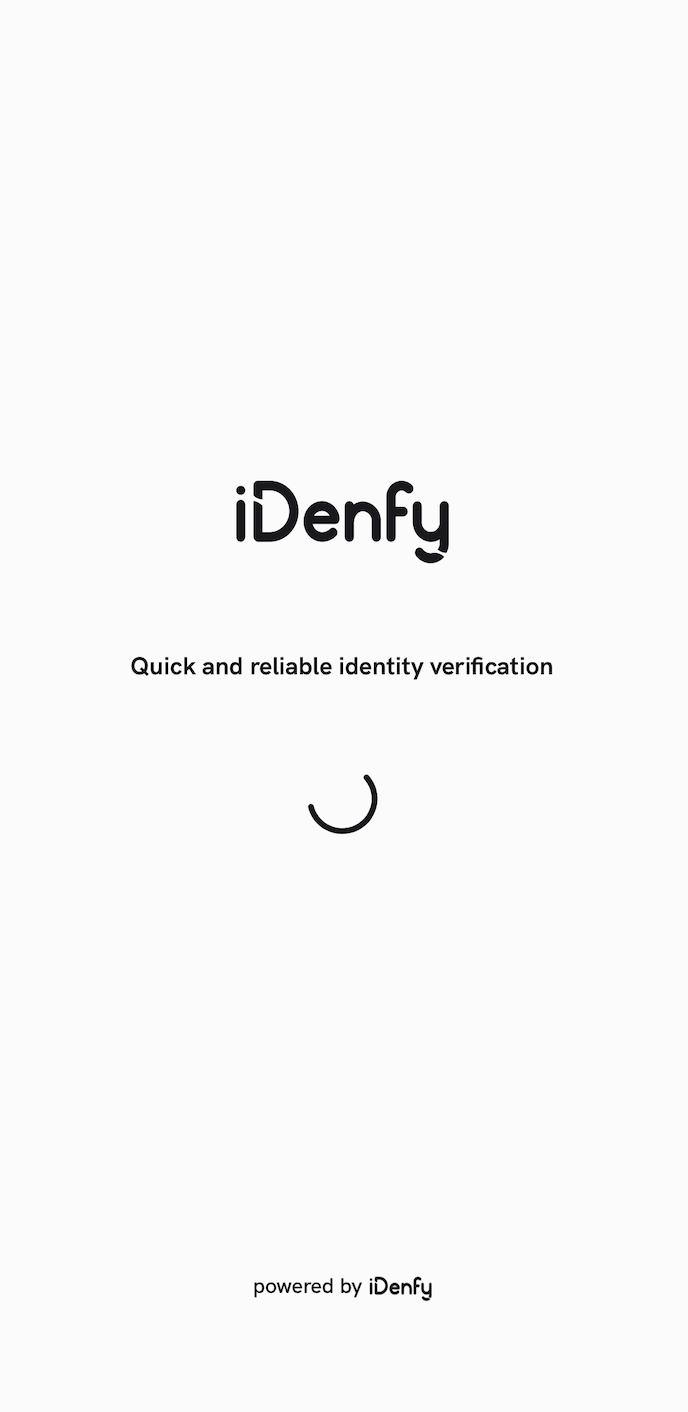
<androidx.constraintlayout.widget.ConstraintLayout xmlns:android="http://schemas.android.com/apk/res/android"
    xmlns:app="http://schemas.android.com/apk/res-auto"
    android:layout_width="match_parent"
    android:layout_height="match_parent"
    android:background="@color/idenfyBackgroundColorV2">

    <ImageView
        android:id="@+id/idenfy_imageview_splash_screen_icon"
        android:layout_width="120dp"
        android:layout_height="120dp"
        android:layout_marginBottom="12dp"
        app:layout_constraintBottom_toTopOf="@+id/idenfy_tv_splash_screen_title"
        app:layout_constraintEnd_toEndOf="parent"
        app:layout_constraintStart_toStartOf="parent"
        app:srcCompat="@drawable/idenfy_ic_splash_screen_icon_drawable_v2" />

    <com.airbnb.lottie.LottieAnimationView
        android:id="@+id/idenfy_lottieanimationview_splash_screen"
        android:layout_width="53dp"
        android:layout_height="53dp"
        android:layout_centerInParent="true"
        android:layout_marginTop="40dp"
        android:scaleType="centerCrop"
        app:layout_constraintEnd_toEndOf="parent"
        app:layout_constraintStart_toStartOf="parent"
        app:layout_constraintTop_toBottomOf="@+id/idenfy_tv_splash_screen_title"
        app:lottie_autoPlay="true"
        app:lottie_colorFilter="@color/idenfySplashScreenViewLoadingSpinnerTintColor"
        app:lottie_loop="true"
        app:lottie_rawRes="@raw/idenfy_custom_file_loader" />

    <com.idenfy.idenfySdk.uicomponents.IDenfyTextView
        android:id="@+id/idenfy_tv_splash_screen_title"
        android:layout_width="0dp"
        android:layout_height="wrap_content"
        android:layout_marginStart="24dp"
        android:layout_marginEnd="24dp"
        android:gravity="center"
        android:text="@string/idenfy_splash_screen_title_v2"
        android:textAlignment="center"
        android:theme="@style/idenfySplashScreenTitleTextStyle"
        android:visibility="visible"
        app:customfont="hkgrotesk_bold.ttf"
        app:layout_constraintBottom_toBottomOf="parent"
        app:layout_constraintEnd_toEndOf="parent"
        app:layout_constraintStart_toStartOf="parent"
        app:layout_constraintTop_toTopOf="parent" />

    <androidx.constraintlayout.widget.ConstraintLayout
        android:layout_width="0dp"
        android:layout_height="wrap_content"
        app:layout_constraintBottom_toBottomOf="parent"
        app:layout_constraintEnd_toEndOf="parent"
        app:layout_constraintStart_toStartOf="parent">

        <com.idenfy.idenfySdk.uicomponents.IDenfyTextView
            android:id="@+id/idenfy_tv_splash_screen_powered_by_idenfy_description"
            android:layout_width="wrap_content"
            android:layout_height="wrap_content"
            android:gravity="center"
            android:text="@string/idenfy_splash_screen_description_v2"
            android:textAlignment="center"
            android:theme="@style/idenfySplashScreenDescriptionTextStyle"
            android:visibility="visible"
            app:customfont="hkgrotesk_semibold.ttf"
            app:layout_constraintBottom_toBottomOf="parent"
            app:layout_constraintEnd_toStartOf="@+id/idenfy_iv_powered_by_idenfy"
            app:layout_constraintHorizontal_chainStyle="packed"
            app:layout_constraintStart_toStartOf="parent"
            app:layout_constraintTop_toTopOf="parent" />

        <ImageView
            android:id="@+id/idenfy_iv_powered_by_idenfy"
            android:layout_width="35dp"
            android:layout_height="wrap_content"
            android:layout_marginStart="4dp"
            android:layout_marginTop="4dp"
            app:layout_constraintBottom_toBottomOf="@+id/idenfy_tv_splash_screen_powered_by_idenfy_description"
            app:layout_constraintEnd_toEndOf="parent"
            app:layout_constraintStart_toEndOf="@+id/idenfy_tv_splash_screen_powered_by_idenfy_description"
            app:layout_constraintTop_toTopOf="@+id/idenfy_tv_splash_screen_powered_by_idenfy_description"
            app:srcCompat="@drawable/idenfy_ic_powered_by_idenfy_v2" />
    </androidx.constraintlayout.widget.ConstraintLayout>
</androidx.constraintlayout.widget.ConstraintLayout>
<color name="idenfyBlackV2">#19181D</color>
[8.7.4] to [8.7.5]
Android Default Alert Dialogs Replaced with New XML Layout
A new idenfy_dialog_generic_alert.xml layout was added that replaces the default Android alert dialogs:<?xml version="1.0" encoding="utf-8"?>
<androidx.constraintlayout.widget.ConstraintLayout xmlns:android="http://schemas.android.com/apk/res/android"
xmlns:app="http://schemas.android.com/apk/res-auto"
android:layout_width="match_parent"
android:layout_height="wrap_content"
android:background="@color/idenfyDefaultAlertDialogBackgroundColor"
android:paddingTop="24dp"
android:paddingStart="24dp"
android:paddingEnd="16dp"
android:paddingBottom="24dp">
<com.idenfy.idenfySdk.uicomponents.IDenfyTextView
android:id="@+id/idenfy_textview_dialog_generic_title"
android:layout_width="0dp"
android:layout_height="wrap_content"
android:textSize="20sp"
android:textColor="@color/idenfyDefaultAlertDialogTitleColor"
app:customfont="hkgrotesk_bold.ttf"
app:layout_constraintTop_toTopOf="parent"
app:layout_constraintStart_toStartOf="parent"
app:layout_constraintEnd_toEndOf="parent" />
<com.idenfy.idenfySdk.uicomponents.IDenfyTextView
android:id="@+id/idenfy_textview_dialog_generic_message"
android:layout_width="0dp"
android:layout_height="wrap_content"
android:layout_marginTop="8dp"
android:textSize="16sp"
android:textColor="@color/idenfyDefaultAlertDialogMessageColor"
app:customfont="hkgrotesk_regular.ttf"
app:layout_constraintTop_toBottomOf="@id/idenfy_textview_dialog_generic_title"
app:layout_constraintStart_toStartOf="parent"
app:layout_constraintEnd_toEndOf="parent" />
<com.idenfy.idenfySdk.uicomponents.IDenfyTextView
android:id="@+id/idenfy_button_dialog_generic_negative"
android:layout_width="wrap_content"
android:layout_height="wrap_content"
android:layout_marginTop="24dp"
android:layout_marginEnd="8dp"
android:paddingStart="16dp"
android:paddingEnd="16dp"
android:textSize="14sp"
android:textAllCaps="true"
android:textColor="@color/idenfyDefaultAlertDialogNegativeButtonColor"
android:clickable="true"
android:focusable="true"
android:visibility="gone"
app:customfont="hkgrotesk_bold.ttf"
app:layout_constraintTop_toBottomOf="@id/idenfy_textview_dialog_generic_message"
app:layout_constraintEnd_toStartOf="@id/idenfy_button_dialog_generic_positive" />
<com.idenfy.idenfySdk.uicomponents.IDenfyTextView
android:id="@+id/idenfy_button_dialog_generic_positive"
android:layout_width="wrap_content"
android:layout_height="wrap_content"
android:layout_marginTop="24dp"
android:paddingStart="16dp"
android:paddingEnd="16dp"
android:textSize="14sp"
android:textAllCaps="true"
android:textColor="@color/idenfyDefaultAlertDialogPositiveButtonColor"
android:clickable="true"
android:focusable="true"
app:customfont="hkgrotesk_bold.ttf"
app:layout_constraintTop_toBottomOf="@id/idenfy_textview_dialog_generic_message"
app:layout_constraintEnd_toEndOf="parent" />
</androidx.constraintlayout.widget.ConstraintLayout>
[8.6.2] to [8.6.3]
Updated Face Capture Oval Design
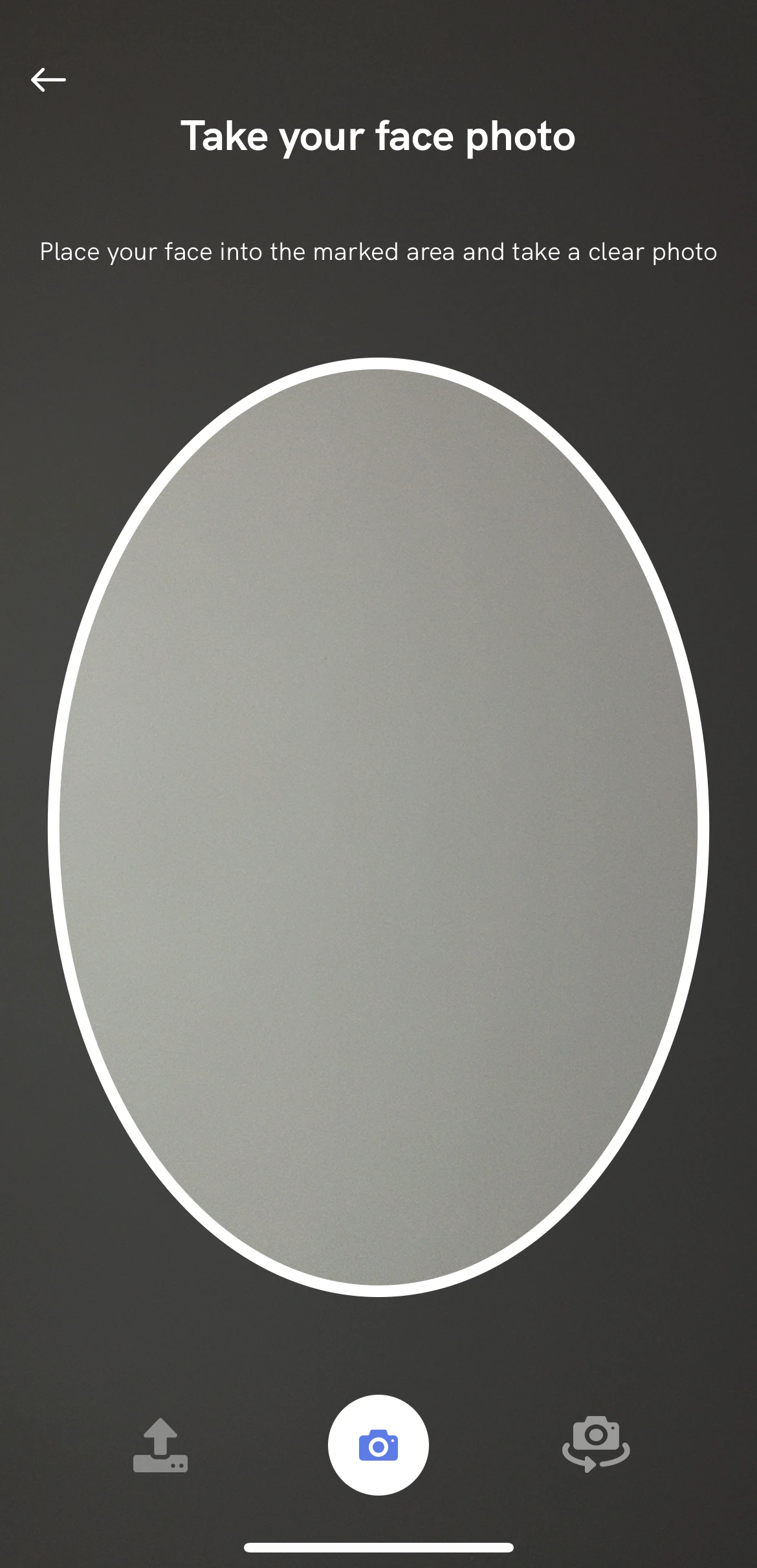
Follow this migration guide point if you have overridden idenfy_fragment_face_camera_preview_session_v2.xml.
        <ImageView
            android:id="@+id/idenfy_imageview_face_camera_preview_session_oval_face_v2"
            android:layout_width="0dp"
            android:layout_height="0dp"
            android:foregroundGravity="center"
            app:layout_constraintBottom_toTopOf="@+id/idenfy_guideline_camera_preview_session_horizontal_085"
            app:layout_constraintEnd_toEndOf="parent"
            app:layout_constraintStart_toStartOf="parent"
            app:layout_constraintTop_toTopOf="@+id/idenfy_guideline_face_camera_preview_session_horizontal_150" />
idenfy_imageview_face_camera_preview_session_oval_face is still available but deprecated and will be removed in the future.
[8.5.x] to [8.6.0]
Added Realtime Blur Glare Detection in Document Capture
Follow this migration guide point if you have overridden idenfy_fragment_document_camera_preview_session_v2.xml.
        <androidx.constraintlayout.widget.ConstraintLayout
    android:id="@+id/idenfy_document_camera_warning_alert"
    android:layout_width="match_parent"
    android:layout_height="50dp"
    android:layout_gravity="center_vertical"
    android:layout_marginStart="16dp"
    android:layout_marginEnd="16dp"
    android:layout_marginBottom="16dp"
    android:alpha="0.7"
    android:visibility="invisible"
    android:background="@color/idenfyWarningLightYellowV2"
    app:layout_constraintBottom_toTopOf="@+id/idenfy_view_camera_preview_session_bottom_action_buttons"
    app:layout_constraintEnd_toEndOf="parent"
    app:layout_constraintStart_toStartOf="parent">

    <ImageView
        android:id="@+id/idenfy_iv_document_camera_warning"
        android:layout_width="20dp"
        android:layout_height="20dp"
        android:layout_marginStart="16dp"
        app:layout_constraintBottom_toBottomOf="parent"
        app:layout_constraintStart_toStartOf="parent"
        app:layout_constraintTop_toTopOf="parent"
        app:srcCompat="@drawable/idenfy_ic_warning_alert" />

    <com.idenfy.idenfySdk.uicomponents.IDenfyTextView
        android:id="@+id/idenfy_textview_idenfy_iv_document_camera_warning_title"
        android:layout_width="0dp"
        android:layout_height="wrap_content"
        android:layout_marginStart="16dp"
        android:layout_marginEnd="24dp"
        android:theme="@style/idenfyDocumentCameraWarningAlertTitleStyle"
        app:customfont="hkgrotesk_regular.ttf"
        app:layout_constraintBottom_toBottomOf="parent"
        app:layout_constraintEnd_toEndOf="parent"
        app:layout_constraintStart_toEndOf="@+id/idenfy_iv_document_camera_warning"
        app:layout_constraintTop_toTopOf="parent" />

</androidx.constraintlayout.widget.ConstraintLayout>
[8.5.x] to [8.5.2]
KYC Questionnaire FILE and IMAGE Questions Merged
idenfy_item_questionnaire_type_image_input_v2.xml has been removed.
[8.4.x] to [8.5.0]
Added Face Detection Progress View to the Camera Drawer
Follow this migration guide point if you have overridden idenfy_partial_layout_face_camera_preview_session_instructions_topsheet_root_v2.xml.
    <ProgressBar
    android:id="@+id/idenfy_progress_bar_face_detection"
    style="?android:attr/progressBarStyleHorizontal"
    android:layout_width="0dp"
    android:layout_height="4dp"
    android:max="100"
    android:progress="0"
    android:visibility="gone"
    android:theme="@style/idenfyFaceCameraPreviewFaceDetectionProgressBarStyle"
    app:layout_constraintBottom_toBottomOf="parent"
    app:layout_constraintEnd_toEndOf="parent"
    app:layout_constraintStart_toStartOf="parent"/>
    <style name="idenfyFaceCameraPreviewFaceDetectionProgressBarStyle" parent="android:Widget.ProgressBar.Horizontal">
        <item name="colorAccent">@color/idenfyFaceCameraPreviewSessionFaceOvalLoadingColor
        </item>
    </style>
[8.3.x] to [8.4.0]
Removed Dynamic OnBoarding View
.withConfirmationView(IdenfyOnBoardingViewTypeEnum.MULTIPLE_DYNAMIC) option is no longer available in IdenfyUISettingsV2.
Follow this migration guide point if you have implemented custom views of idenfy_fragment_onboarding_v2.xml or idenfy_fragment_face_authentication_initial_view_v2.
[8.2.x] to [8.3.0]
Removed Instructions Drawer Option from Camera View
The instructions drawer has been removed. The top drawer will remain static as if instructions were disabled, and will only hold camera descriptions and the app bar..withInstructions(IdenfyInstructionsType.DRAWER) option is no longer available in IdenfyUIBuilderV2.
Follow this migration guide point if you have overridden idenfy_partial_layout_face_camera_preview_session_instructions_topsheet_root_v2.xml or idenfy_partial_layout_document_camera_session_instructions_topsheet_root_v2.xml.
<androidx.constraintlayout.widget.ConstraintLayout xmlns:android="http://schemas.android.com/apk/res/android"
    xmlns:app="http://schemas.android.com/apk/res-auto"
    android:id="@+id/idenfy_constraintlayout_camera_session_instructions_top_sheet_layout_root"
    android:layout_width="match_parent"
    android:layout_height="@dimen/idenfy_dimen_document_and_face_camera_session_view_drawer_height"
    android:background="@drawable/idenfy_custom_drawable_instructions_background_without_rounded_corners"
    android:fillViewport="true"
    android:orientation="vertical">
    <com.idenfy.idenfySdk.uicomponents.IDenfyTextView
        android:id="@+id/idenfy_textview_camera_session_instructions_information_title"
        android:layout_width="0dp"
        android:layout_height="wrap_content"
        android:layout_marginStart="16dp"
        android:layout_marginTop="8dp"
        android:layout_marginEnd="16dp"
        android:gravity="center"
        android:textAlignment="center"
        android:theme="@style/idenfyDocumentCameraPreviewTitleStyle"
        app:customfont="hkgrotesk_bold.ttf"
        app:layout_constraintEnd_toEndOf="parent"
        app:layout_constraintHorizontal_bias="0.5"
        app:layout_constraintStart_toStartOf="parent"
        app:layout_constraintTop_toTopOf="@+id/idenfy_guideline_instructions_camera_session_max_collapsed_drawer_height" />