

Requirements
- API key pair
- Custom flow created via dashboard
- Session creation via API enabled (done by iDenfy’s staff)
- Finances
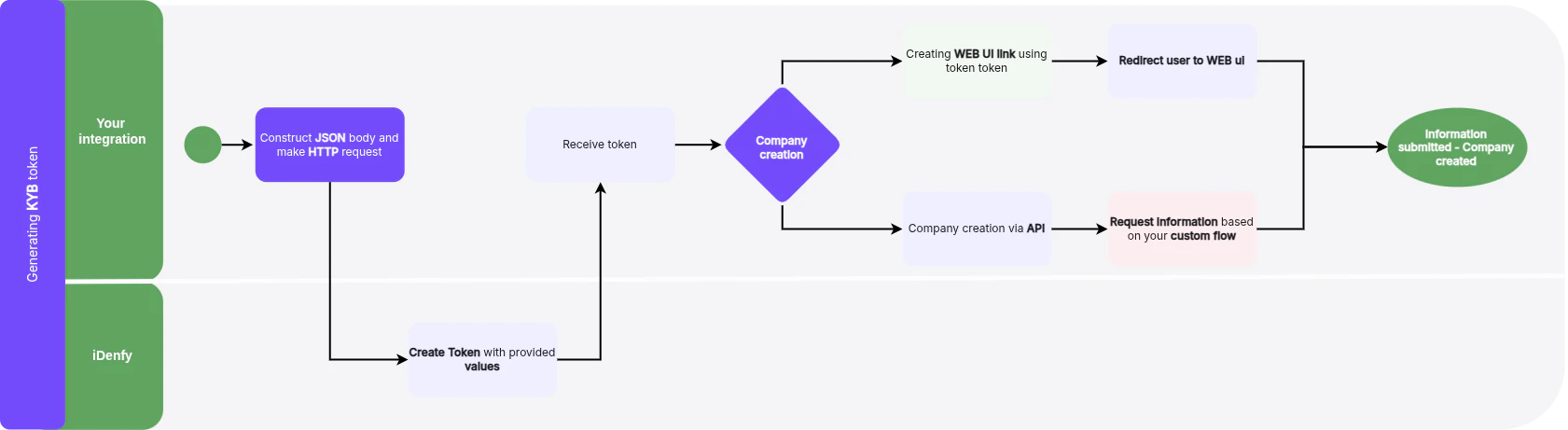
Step 1: Create Business Verification Form Session
For full request and response details, see the API Reference tab for the
kybTokensCreate endpoint.Step 2: Create Company
Once the token is generated you can either:Create Redirection Link to Web UI
To redirect the user to the iDenfy Business verification UI, construct the redirect URL as follows:- Start with the base URL
- Obtain the
tokenStringvalue from the new Business verification token response - Append this
tokenStringvalue directly to the end of the base URL:https://kyb.ui.idenfy.com/welcome?authToken=
tokenString received from the API is 9TIMoX4oSVmWDJ8qS7zeFUMTh5hi1EcqqLTrPR9r, the complete redirect URL will be: