

Requirements
- API key pair
- Successfully created
tokenString- used as Authorization
Authorization
Both credentials are accepted, but not by every endpoint. Calling a token-only endpoint with the API key pair returns 401.Business Verification Schema
See the recommended integration and use schema below.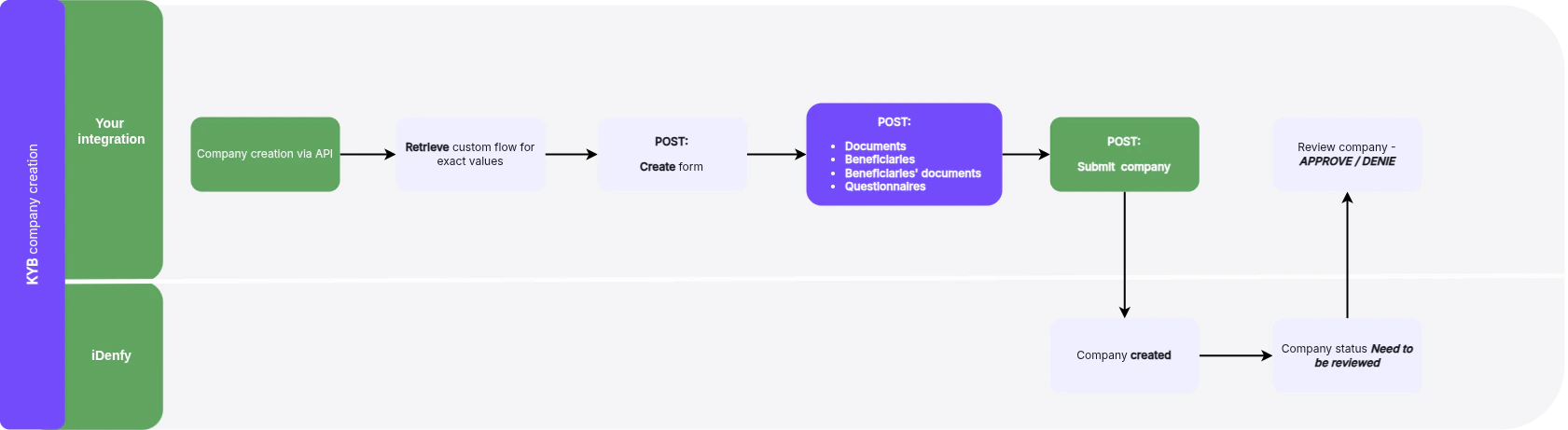
Check Flow
To determine what data the form requires, call the Business verification Token Retrieve endpoint.For the Business verification Token Retrieve endpoint (retrieves flow information related to the specific token, detailing the data required for form submission), see the API Reference tab for
kybInfoRetrieve.You can skip this step if you use the same flow, since the data fields are similar.
Form Creation
Create a Business verification Form by sending a request to the form creation endpoint.For the Create Business verification form endpoint (creates a new form linked to the generated token for capturing and submitting necessary compliance information), see the API Reference tab for
kybFormsCreate.- Info Retrieve - Retrieves detailed information about an active Business verification session, including various aspects of the company’s compliance and verification process. See
kybFormsRetrievein the API Reference. - Form Update - Updates information on an existing Business verification form. See
kybFormsUpdatein the API Reference. - Form Partial Update - Partially updates specific sections of an existing Business verification form. See
kybFormsPartialUpdatein the API Reference.
- List Business verification forms - Lists all forms associated with a particular token. See
kybFormsListin the API Reference.
- Form endpoints accept an
Idempotency-Keyheader for safe retries. - Company prefill and AI document analysis are each limited to 10 calls per token.
- The company search endpoint is
/kyb/company-search— with no trailing slash, unlike every other KYB path.
Documents
You can manage documents within the Business verification form/company. The following operations are available:Upload Constraints
- Files are uploaded base64-encoded, up to 20 MiB per file.
- Only JPEG, PNG, and PDF are accepted. Password-protected PDFs are rejected.
- Which document types you may upload is fixed by the workflow attached to the token.
- There is no limit on the number of documents.
Beneficiaries
You can manage beneficiaries within the Business verification form/company. The following operations are available:
Further
scanRef constraints:
- Individual beneficiaries only. It cannot be set on a company-type beneficiary.
- The verification must belong to your partner account.
- The verification does not need to be approved.
Beneficiaries’ Documents
You can manage beneficiaries’ documents using the following operations:Questionnaires
A questionnaire can be added to the flow. To check whether the form requires a questionnaire to be filled out, use the following endpoints:- Questionnaire list - Lists all available questionnaires associated with the Business verification form flow. See
kybFormsQuestionnairesListin the API Reference. - Retrieve specific questionnaire - Retrieves a particular questionnaire within the Business verification process. See
kybFormsQuestionnairesRetrievein the API Reference.
Answers are written with PUT only —
PATCH returns 405. Retrieving answers returns 204 when the questionnaire has no sections.Form Submit
When the form is filled, it can be submitted. SeekybFormsSubmitCreate in the API Reference.
Once you submit the form, iDenfy sends a webhook notification to your endpoint.
Why a Submit Returns 400
Submission validates the whole form. It fails when:- A required company field or required document is missing.
- A required beneficiary type is missing, or a beneficiary is missing a required field or document.
- The ownership structure is incomplete.
- A questionnaire is unanswered.
- A beneficiary has not completed their identity verification.
- A sole proprietor form has more than one beneficiary.
After Submit
The sessiontokenString is deactivated on submit and the form becomes read-only. It reopens only if a reviewer requests more information.